 KeyFlow
你的 Mac,
少点琐事。Your Mac,
minus the busywork.
用说的代替打字,截一张图就能问 AI,复制过的东西随时找回。一个安静的菜单栏应用。Talk instead of type, grab and explain any screenshot, find anything you copied. One quiet menu bar app.
会说你的语言的
Mac AI。AI on your Mac that
speaks your languages.
用中文、English 或日本語听写、翻译和提问,输入法不会被打断。Dictate, translate and ask in English, 中文 or 日本語 without your input method breaking.
四个 Mac 工具,
一份订阅。Four Mac utilities.
One subscription.
语音输入、截图、剪贴板和 AI 助手,每月 1,000 Credit。免费试用 14 天,无需绑卡。Voice, screenshots, clipboard and an AI assistant with 1,000 credits a month. Try it 14 days, no card.
之后 $9.99 / 月或 $99 / 年 · 随时取消 · 首次购买 14 天内可退款Then $9.99/month or $99/year · cancel anytime · 14-day refund on your first purchase
一个应用,取代你装的这些:One app instead of:
- 听写应用a dictation app
- 剪贴板管理器a clipboard manager
- 截图标注工具a screenshot tool
- AI 聊天窗口an AI chat window
- 便签和待办sticky notes and to-dos
- 改键和手势工具a key remapper
按一个键,事情就办完One key, and it's done
KeyFlow 待在菜单栏里,需要时一个快捷键叫出来,用完就消失。每个快捷键都可以改。KeyFlow lives in your menu bar. One shortcut brings each tool up, and it gets out of the way when you're done. Every shortcut can be changed.
语音输入Voice input
按住 Fn 说话,松开就在光标处插入整理好的文字:去掉「嗯、那个」,加好标点。中英混说也行,不计 Credit。Hold Fn and talk; release and tidy text lands at your cursor, with filler words gone and punctuation in place. Mix languages freely. Voice never costs credits.
了解语音输入 →About voice input →AI 助手胶囊AI assistant capsule
在任何应用里按 ⌥Space,选中的文字自动带上。问问题、联网查资料、生图,回答就浮在你正在做的事上方。Press ⌥Space in any app and your selection comes along. Ask, search the web or make an image; the answer floats over what you're doing.
了解 AI 助手 →About the assistant →AI 指令与技能AI actions & skills
选中文字按 ⌃1 翻译、⌃2 优化、⌃3 解释,↩ 直接替换原文。把常用的提示词存成自己的指令;常做的事会变成技能,一句「周报」就办完。Select text: ⌃1 translates, ⌃2 polishes, ⌃3 explains, and ↩ replaces the original. Save your own prompts as actions; things you ask often become skills, so “weekly report” just works.
了解指令与技能 →About actions & skills →剪贴板历史Clipboard history
复制过的文字和图片都在。⌘⇧V 打开,输入即搜,↩ 贴回原来的应用。密码管理器里的内容不会被记录。Everything you copied, text and images. ⌘⇧V opens it, type to search, ↩ pastes back into the app you came from. Nothing from password managers is recorded.
了解剪贴板 →About clipboard →截图与标注Screenshot & annotate
框选截图,画箭头、编号、文字,可以手绘风格。钉在屏幕上对照着看,或者交给 AI 解释、翻译。⌥/ 直接识别屏幕上的文字。Capture an area, add arrows, numbered pins and text, even in a hand-drawn style. Pin it on screen, or hand it to AI to explain or translate. ⌥/ reads on-screen text straight to your clipboard.
截图快捷键 →Screenshot shortcuts →桌面便签Pinned notes
⌃⌥N 新建一张便签钉在桌面上,选中文字 ⌃⌥⇧N 直接变成便签。一条笔记可以一键拆成待办。⌃⌥N pins a new sticky note to your desktop, and ⌃⌥⇧N turns selected text into one. Split any note into to-dos with one key.
了解便签 →About notes →今天与待办Today & to-dos
双指从触控板左缘划入,或按 ⌥`,打开「今天」面板。⌃⌥T 把选中的文字变成待办,Tab 把一条待办交给助理接着做。Swipe two fingers in from the trackpad's left edge, or press ⌥`, for the Today panel. ⌃⌥T turns a selection into a to-do; Tab hands a to-do to the assistant.
了解待办 →About to-dos →专注计时Focus timer
挑一条待办开始专注,倒计时就在菜单栏图标旁。勿扰模式随专注开关,一轮结束顺手标记完成。Pick a to-do and start; the countdown sits next to the menu bar icon. Do Not Disturb follows along, and you can tick the to-do off when the round ends.
了解专注 →About Focus →改键、切换与手势Remaps, switching & gestures
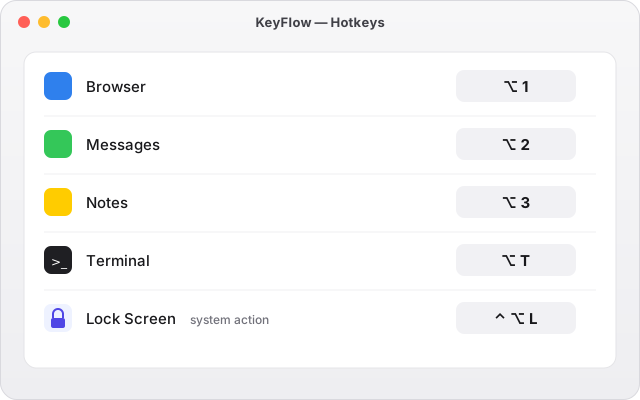
Caps Lock 单击是 Esc、按住是 Hyper 或方向键层;⌥1…9 秒开应用;三指、四指轻扫新建、关闭窗口,或把窗口吸附到半屏。Caps Lock taps as Esc and holds as Hyper or an arrow-key layer; ⌥1…9 jump to your apps; three- and four-finger swipes open and close windows or snap them to half the screen.
了解切换与手势 →About switching →中文、日文输入法不会被打断Your Chinese and Japanese typing stays intact
很多快捷键工具和 AI 应用一碰到输入法的候选框就出错:吞字、重复上屏、快捷键失灵。KeyFlow 从第一天起就在中文输入法下开发和测试。Many shortcut tools and AI apps trip over an input method's candidate window: swallowed characters, double commits, dead shortcuts. KeyFlow has been built and tested with Chinese input methods from day one.
- 截图和屏幕识字支持中、英、日文Screenshot OCR reads Chinese, English and Japanese
- AZERTY、QWERTZ、Dvorak 键盘布局下快捷键照样对Shortcuts follow AZERTY, QWERTZ and Dvorak layouts
一个方案,全部功能One plan, everything included
登录后先免费用 14 天,所有功能都能用,送 300 Credit 试 AI。不需要绑卡,到期不会自动扣费。Sign in and use everything free for 14 days, with 300 credits to try the AI. No card, so nothing is charged when the trial ends.
月付Monthly
每月 · 中国大陆 ¥58per month · mainland China ¥58
- 全部功能,最多 3 台 MacEvery feature, on up to 3 Macs
- 每月 1,000 Credit(价值 $10)1,000 credits a month (worth $10)
- 语音输入不计 CreditVoice input never uses credits
- 云同步待办、笔记、设置和记忆(即将推出)Cloud sync for to-dos, notes, settings and memory (coming at launch)
年付 · 省 17%Yearly · save 17%
每年,约 $8.25 / 月 · 中国大陆 ¥588per year, about $8.25/month · mainland China ¥588
- 月付的全部内容Everything in Monthly
- Credit 照样按月发放,每月 1,000Still 1,000 credits every month
- 朋友邀请来的:首年 8 折($79.20)Invited by a friend: 20% off your first year ($79.20)
Credit 不够用时,订阅期间可以买 Credit 包:$4.99 起,500 Credit。Need more AI? Subscribers can add a credit pack, from $4.99 for 500 credits. 完整价格与 Credit 说明Full pricing and credit details
数据怎么处理How your data is handled
按键只在本机处理Keystrokes stay on your Mac
KeyFlow 需要辅助功能权限来响应快捷键,但不记录、不上传你输入的内容。KeyFlow needs the Accessibility permission to respond to shortcuts, and never records or uploads what you type.
AI 只在你触发时发送AI runs only when you ask
你选中、口述或提问的内容会经由我们的服务器发给 AI 模型服务商生成结果。服务器记录用量和费用,不把你的文字写进数据库。What you select, dictate or ask goes through our server to an AI model provider to produce the result. Our server records usage and cost, and doesn't write your text to its database.
同步数据加密存储Synced data is encrypted
云同步(即将推出)的待办、笔记、设置和记忆加密传输、加密存储,只有你的账户能访问。剪贴板历史不同步。With cloud sync (coming at launch), to-dos, notes, settings and memory are encrypted in transit and at rest, and only your account can access them. Clipboard history is never synced.
崩溃报告匿名,网站不用 cookieAnonymous crash reports, no tracking cookies
KeyFlow 崩溃或卡顿时,只发送调用记录、版本号和性能数字,不含你的内容,不关联账户,90 天后删除,可以在设置里关掉;「导出诊断信息」只存在你的 Mac 上。网站用 Plausible 统计访问量,不设 cookie,不保存 IP。细节见If KeyFlow crashes or hangs, it sends only the call stack, version numbers and performance figures: no content, not linked to your account, deleted after 90 days, and you can turn it off; "Export Diagnostics" stays on your Mac. This site counts visits with Plausible, with no cookies and no stored IP addresses. Details in the 隐私政策Privacy Policy。.
常见问题FAQ
有免费版吗?Is there a free plan?
没有。KeyFlow 只有一个付费方案,所以每个功能都完整、没有「Pro」角标。你可以先免费试用 14 天,不需要绑卡。No. KeyFlow has one paid plan, so every feature is complete and nothing is locked behind a badge. You can try all of it free for 14 days, no card needed.
试用结束后会怎样?What happens when the trial ends?
KeyFlow 会暂停:Caps Lock 恢复系统默认,隐藏的菜单栏图标全部回来,快捷键不再生效。你的设置和本机数据都保留,笔记和待办可以导出成 Markdown;订阅后一切立即恢复。KeyFlow pauses: Caps Lock goes back to normal, hidden menu bar icons come back and shortcuts stop. Your settings and local data are kept, notes and to-dos can be exported as Markdown, and everything comes back the moment you subscribe.
Credit 是什么?够用吗?What's a credit, and is 1,000 enough?
$1 = 100 Credit。翻译、优化这类文本操作每千字 1 Credit,问助理一次 1 Credit,联网搜索再加 1,生一张图 35 Credit。每月 1,000 Credit 大约是 1,000 次提问或 28 张图。语音输入不计 Credit。$1 = 100 credits. Text actions like translate or polish cost 1 credit per 1,000 characters, an assistant question costs 1 (plus 1 if it searches the web), and an image costs 35. 1,000 credits is roughly 1,000 questions or 28 images a month. Voice input is free of credits.
我的内容会被拿去训练模型吗?Is my content used to train models?
不会。我们只用付费的商用接口,并在可用时开启零数据保留。哪些内容在什么时候发给谁,都写在隐私政策里。No. We use paid commercial APIs only, with zero data retention turned on where it's offered. The Privacy Policy lists what is sent, when, and to whom.
需要什么系统?What do I need?
macOS 13 Ventura 或更新版本,Apple 芯片或 Intel 都可以。需要「辅助功能」权限;语音输入需要麦克风权限;手势需要内置或妙控触控板。macOS 13 Ventura or later, on Apple silicon or Intel. KeyFlow needs the Accessibility permission; voice input needs the microphone; gestures need a built-in or Magic Trackpad.
可以退款吗?Can I get a refund?
首次购买和年付续费 14 天内可以无理由全额退款。付款由 Paddle 作为记录商户处理。Yes: a full refund within 14 days of your first purchase or a yearly renewal, no questions asked. Payments are handled by Paddle, our Merchant of Record. 退款政策Refund Policy
更多问题 →More questions → · 帮助中心Help Center · 联系我们Contact us
今天就把琐事交给 KeyFlowHand the busywork to KeyFlow today
macOS 13+ · Developer ID 签名并经过 Apple 公证 · 免费试用 14 天,无需绑卡macOS 13+ · Signed with Developer ID and notarized by Apple · 14-day free trial, no card